How to Use an OBD2 Scanner: A Beginner’s Guide
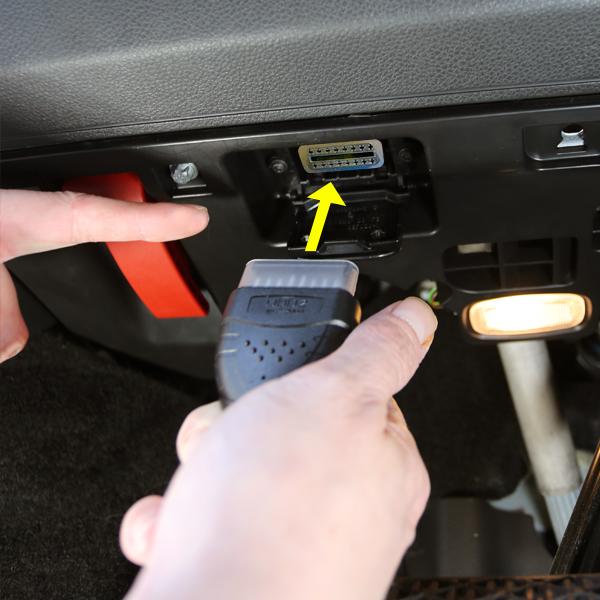
An OBD2 scanner plugs into your car’s diagnostic port and reads the trouble codes your engine computer stores when something goes wrong, such as when the check engine light comes on. To use one, plug it in, turn the ignition on, read the codes, and write them down before doing anything else. This guide is for US drivers with a basic scanner and beginner-level mechanical knowledge. A scanner shows what the computer detected, not which part has failed, so treat every code as a clue rather than a verdict.
Key points
- Most passenger vehicles sold in the US since the 1996 model year have an OBD2 port, but the exact location and supported features vary by vehicle.
- Read and record the codes first. Do not clear them until you understand what they mean.
- A code points to a system or circuit, not automatically to a bad part.
- A flashing check engine light, a red warning light, or serious symptoms mean you should avoid driving and get help.
What Is an OBD2 Scanner?
OBD2 stands for On-Board Diagnostics, second generation. Your vehicle’s computer monitors engine, emissions, and other systems. When it detects a fault that meets its criteria, it stores a diagnostic trouble code (DTC) and usually turns on the check engine light. A scanner connects to the vehicle’s computer and displays those stored codes in a readable form.
Depending on the scanner and the vehicle, a scanner can:
- Display stored and pending trouble codes, and permanent codes on some tools
- Show freeze frame data, a snapshot of conditions when the fault was recorded (not every tool or vehicle provides it)
- Show live sensor data on many models
- Show whether emissions-related self-tests (readiness monitors) have completed
- Clear stored codes, with consequences explained below
A scanner cannot tell you with certainty which part to replace, confirm a repair was done correctly, or replace a proper inspection of safety-critical systems.
Types of OBD2 Scanners
| Type | What it generally offers | Best for |
|---|---|---|
| Basic code reader | Reads and clears codes; sometimes extra data | Quick first checks |
| Bluetooth/Wi-Fi adapter | Codes and data through a phone app; features depend on the app | Drivers who prefer using a phone |
| Handheld scan tool | Codes, live data, readiness status, extra features depending on the model | Regular home maintenance |
| Professional scan tool | Wider access to systems and manufacturer-specific data, depending on coverage | Technicians and professionals |
Features vary widely between products and between vehicles. Check that a scanner supports your vehicle before you buy.
What You Need
- An OBD2 scanner or adapter compatible with your vehicle
- Your owner’s manual, to confirm the port location and any manufacturer-specific notes
- A smartphone, if you are using a Bluetooth or Wi-Fi adapter
- A pen and paper, or your phone camera, to record what you see
You do not need tools to open anything. The port is designed to be accessed from inside the cabin.
How to Use an OBD2 Scanner Step by Step
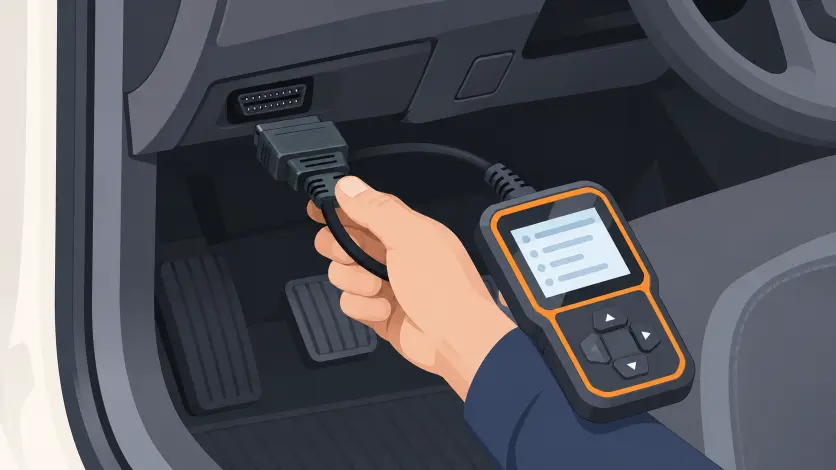
- Park safely. Park on level ground with the parking brake applied. Do not operate a scanner while driving. If you want live data during a drive, have a passenger operate it.
- Find the diagnostic port. It is a 16-pin connector, usually under the dashboard on the driver’s side, sometimes behind a small panel or near the center console. Check the owner’s manual if you cannot find it.

- Turn the ignition off, then plug in the scanner. The connector fits one way. Do not force it, and keep the cable clear of the pedals and your feet.

- Turn the ignition to ON. This powers the dashboard without starting the engine. The required ignition position can differ by vehicle and scanner, and some tests need the engine running. Follow your scanner’s instructions. Never run the engine in a closed garage or enclosed space, because exhaust contains carbon monoxide.
- Wait for the connection. Handheld scanners usually connect automatically. For a Bluetooth or Wi-Fi adapter, pair it with your phone and select it in the app. If you see a communication error, check the connection, the ignition position, and whether the scanner supports your vehicle.
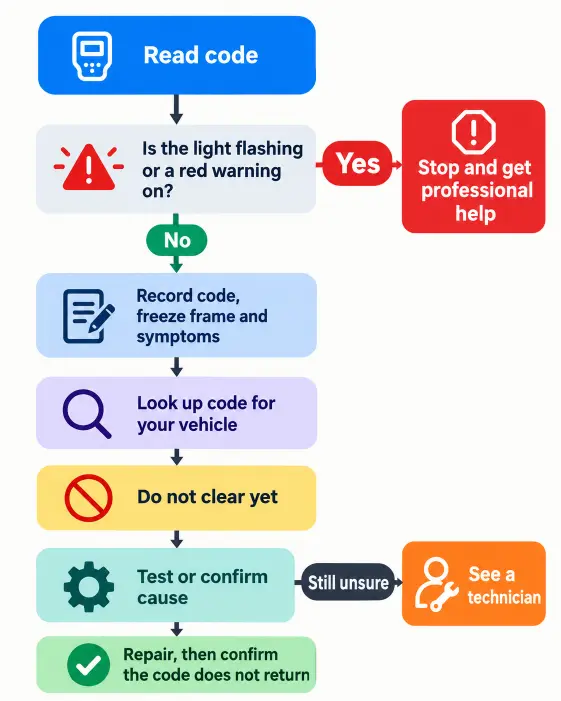
- Choose the option to read codes. The menu may say Read Codes, DTCs, or Trouble Codes. Note whether each code is stored, pending, or permanent.
- Record everything. Write down or photograph each code, its description, any freeze frame data, the mileage, whether the check engine light is solid or flashing, and any symptoms you have noticed.
- Look up each code for your vehicle. The generic description is a starting point. Some codes have manufacturer-specific meanings that may require model-specific service information.
- Decide the next step before clearing anything. See the sections below on interpreting results and clearing codes.
- Turn the ignition off and unplug the scanner. Store it somewhere safe.
Safety first: if the check engine light is flashing, a red warning light is on, the engine overheats, you smell fuel or burning, the brakes feel wrong, or the engine runs very roughly or loses power, avoid driving as much as possible and stop in a safe place. A flashing light can indicate an active misfire, which can damage the catalytic converter. Arrange professional help.
How to Read an OBD2 Code
A code such as P0301 has five characters, and each part carries information.
| Character | What it means | Example (P0301) |
|---|---|---|
| First (letter) | System family: P powertrain, B body, C chassis, U network | P: powertrain |
| Second (digit) | 0 is usually a generic code; 1 is usually manufacturer-specific | 0: generic |
| Third (digit) | Subsystem category; the meaning depends on the code family | 3: ignition system or misfire (in the P03xx range) |
| Last two (digits) | The specific fault within that group | 01: cylinder 1 |
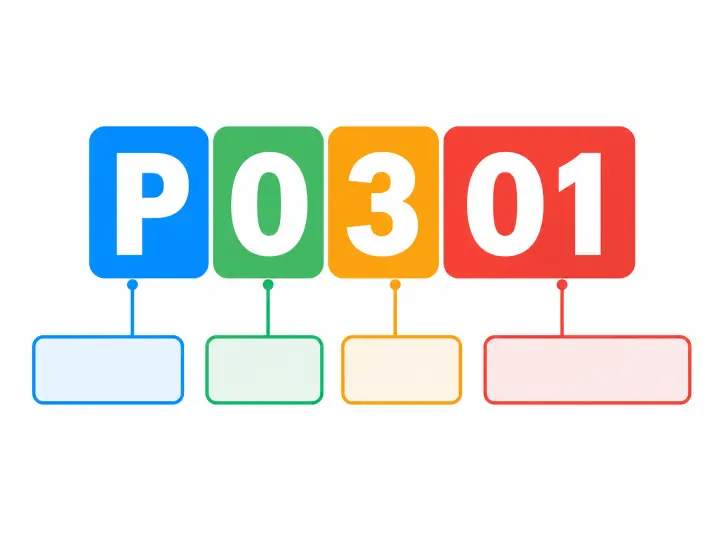
So P0301 is a generic powertrain code reporting a misfire detected in cylinder 1. It does not prove that a spark plug or ignition coil is bad. Many basic scanners read only powertrain codes; body, chassis, and network codes may require a more capable tool.
How to Interpret OBD2 Scanner Results
Separate what the code says from what is actually wrong. A code reports that a measurement or test failed. It does not identify the root cause.
Worked example: P0420. Commonly described as catalyst system efficiency below threshold. A worn catalytic converter can cause it, but so can an exhaust leak, a faulty oxygen sensor, or an engine running problem. Replacing the converter based on this code alone could waste money and leave the real cause unfixed.
Worked example: P0300. Random or multiple cylinder misfires detected. Possible causes include ignition components, fuel delivery, vacuum leaks, or mechanical problems. A misfire can be serious, particularly if the light is flashing.
| What you see | What it may mean | Next step |
|---|---|---|
| Solid light, no obvious symptoms | A logged fault that needs checking | Record the codes and schedule an inspection |
| Flashing check engine light | Possibly an active misfire that risks the catalytic converter | Reduce load, stop safely, and get help |
| Pending code | A possible fault that has not yet met the criteria for confirmation | Record it and follow the manufacturer’s diagnostic guidance |
| Several codes at once | A shared cause such as a voltage or wiring issue, or separate independent faults | Review the context and data before replacing parts |
| No codes but symptoms exist | The scanner may not support the affected system, or the fault was not logged | Rely on symptoms and inspection, not the absence of a code |
These entries are possibilities, not confirmed diagnoses. If your main symptom is a car that will not start, see why your car won’t start, since a no-start does not always set a code. If you suspect low voltage or poor connections, see how to test a car battery with a multimeter. Confirm basics like fluids separately, for example with our guide to how to check engine oil level.
Other terms you may see:
- Stored vs. pending codes. A stored code is confirmed by the computer. A pending code means the vehicle detected a possible fault that has not yet met the criteria for confirmation. Depending on the fault and the vehicle’s monitoring conditions, it may become confirmed or may no longer appear. Record it and follow the manufacturer’s diagnostic guidance.
- Freeze frame data. Conditions such as engine speed and temperature when the fault was recorded. Useful for a technician.
- Readiness monitors. Self-tests for emissions systems. Some regions check their status during emissions inspection.
A complete example: P0301 on a check engine light
- Situation: the check engine light comes on and the engine feels slightly rough at idle. The light is solid, not flashing.
- Scan: the scanner shows P0301 as a stored code.
- Record: write down P0301, the mileage, any freeze frame data shown, and the symptom (rough idle).
- What you can conclude: the computer detected a misfire in cylinder 1.
- What you cannot conclude: which part is at fault, or that a mechanical problem can be ruled out. The code alone does not identify the cause. A worn spark plug or coil, a fuel delivery problem, a vacuum leak, or an internal engine issue could all produce it.
- What you can check yourself: note whether the roughness is constant or only at idle, whether it happens cold or warm, and whether the code returns after a short drive. Write this down for the technician.
- Safe next step: avoid hard driving and watch whether the light starts flashing. If it does, stop driving as soon as it is safe. Have the cause diagnosed with proper tests before buying parts.
Should You Clear OBD2 Codes?
Usually not right away. Clearing codes typically erases the stored code and freeze frame data and resets the readiness monitors. That has consequences:
- You lose information a technician could use.
- If the fault is real, the light is likely to return.
- Readiness monitors need time and driving conditions to complete again, which can matter for an emissions inspection.
Never clear codes to hide a problem or get past an inspection. If you clear a code after a verified repair, drive normally and check that it does not return. Emissions testing rules vary by state, so check your state’s official program for details.
Common Mistakes to Avoid
- Replacing parts based on a code alone. Confirm the cause first.
- Clearing codes immediately. Record them first and understand why they appeared.
- Ignoring a flashing light. Treat it as urgent.
- Assuming every scanner works on every vehicle. Check compatibility.
- Leaving an adapter plugged in indefinitely. Some devices draw power continuously. Follow the manufacturer’s guidance.
- Using advanced features without understanding them. Some tools can change settings or perform programming functions. Stick to reading codes unless you know what you are doing.
When to Seek Professional Help
See a qualified technician if:
- The check engine light is flashing, or a red warning light is on
- The vehicle overheats, loses power, or has brake, steering, or airbag warnings
- The code relates to a safety-critical system
- The same code keeps returning after a repair
- You are unsure what the code means or what to check next
- You have several unrelated codes at once
Bring your written notes: the codes, freeze frame data, mileage, symptoms, and when they started.
Frequently Asked Questions
Will an OBD2 scanner work on my car?
Most passenger vehicles sold in the US since the 1996 model year have an OBD2 port, but compatibility and features vary. Check the scanner’s specifications and your owner’s manual.
Where is the OBD2 port located?
Usually under the dashboard on the driver’s side, though some vehicles hide it behind a panel or place it near the center console. Your owner’s manual shows the exact spot.
Can I use an OBD2 scanner with the engine off?
Yes, in most cases. Turn the ignition to the ON position without starting the engine. Some vehicles and scanners behave differently, so follow your scanner’s instructions.
What does a pending OBD2 code mean?
It means the vehicle detected a possible fault that has not yet met the criteria for confirmation. Depending on the fault and the vehicle’s monitoring conditions, it may become confirmed or may no longer appear. Record it and follow the manufacturer’s diagnostic guidance.
Will clearing codes turn off the check engine light?
It usually turns the light off temporarily. If the underlying fault is still present, the light is likely to come back. Clearing also erases freeze frame data and resets readiness monitors.
Can a basic OBD2 scanner read ABS codes?
Only some can. Many basic scanners read just powertrain and emissions-related codes, so ABS and airbag codes may require a more capable tool.
Can a scanner tell me exactly what part to replace?
No. It reports what the computer detected. Further checks are usually needed to find the cause.
Can I damage my car by using a scanner?
Reading codes with a compatible scanner used as directed is designed to be non-invasive. Poor-quality devices or advanced functions used incorrectly can cause problems, so follow the instructions.
How do I know the check engine light is really off after a repair?
The light going out is not proof of a fix. Drive normally and check that the code does not return.
Conclusion
Using an OBD2 scanner is a simple way to learn why your check engine light came on. Plug it in, read and record the codes, look up what they mean for your vehicle, and resist the urge to clear them or buy parts straight away. Use the information to ask better questions, check likely causes, and know when to seek professional help.
Sources and Further Reading
- Your vehicle’s owner’s manual: diagnostic port location, warning lights, and manufacturer-specific codes.
- U.S. EPA: Vehicle Emissions Inspection and Maintenance, On-Board Diagnostic (OBD) resources: how OBD checks are used in emissions inspection programs.
- NHTSA recalls: check your vehicle for open safety recalls.
- Your state’s official vehicle inspection or emissions program page, for local requirements.
Related articles

How to Read a Check Engine Light Code: Step-by-Step Guide
To read a check engine light code, plug an OBD-II scanner into the diagnostic port under the dash, turn the ignition to the on…

P0300 and P0420 Codes: Causes and What to Do
P0300 means the engine computer detected random or multiple-cylinder misfires. P0420 means it judged that the catalytic converter (bank 1) is not cleaning exhaust…
1 comment